Reviewed visual proof
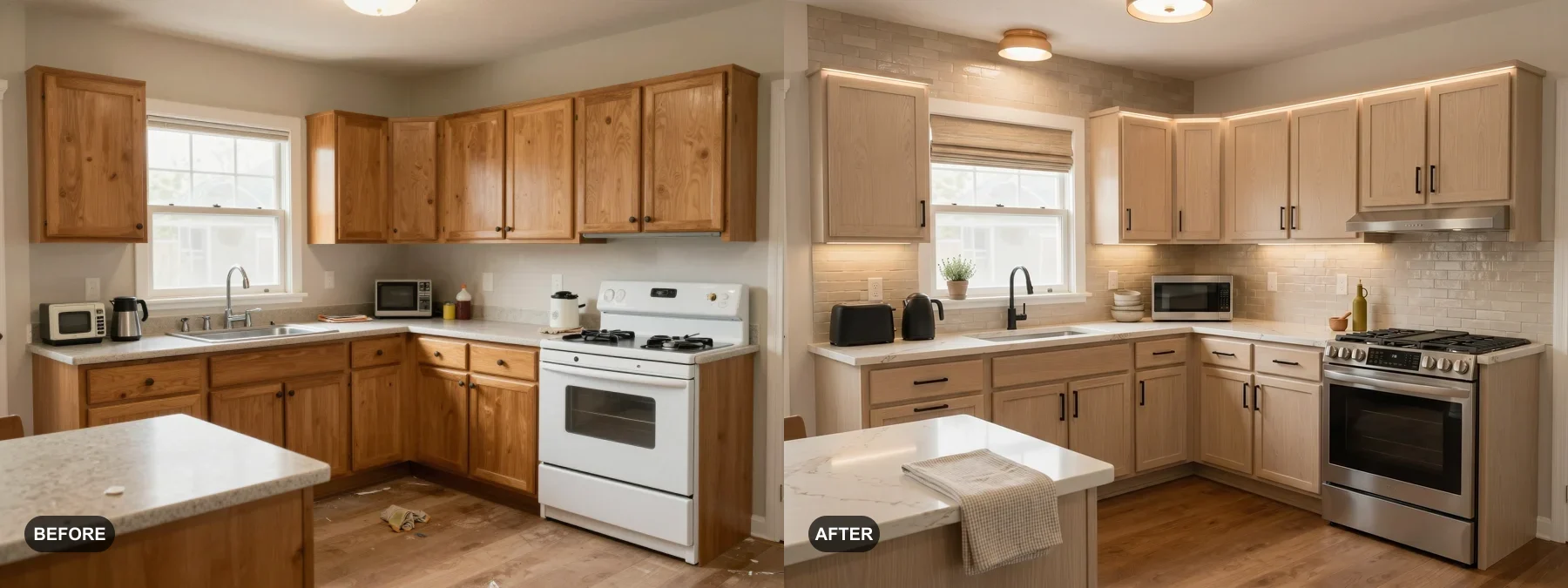
A matching before and after case
These examples were selected to show a clear paid-use reason: listing photos, rental appeal, renovation planning, or client presentation.
AI virtual staging can illustrate a possible styling direction for visible counters and decor. It does not renovate the kitchen, establish condition, or predict listing performance.
Reviewed visual proof
These examples were selected to show a clear paid-use reason: listing photos, rental appeal, renovation planning, or client presentation.
A kitchen photo needs to show visible surfaces, storage, circulation, fixtures, and the relationship to nearby rooms. A generated styling concept does not establish condition, function, value, or listing performance.
RoomFlip can add decor and visual styling cues, but it may also alter cabinets, counters, appliances, windows, lighting, scale, or structure. Compare every result with the original.
A restrained concept may add countertop accessories, color, and lighting cues. Check that generated objects do not hide defects, change amenities, block circulation, or imply features that are not present.
A view from an island, breakfast bar, doorway, or corner can provide useful context when it shows the main counters and nearby space. Choose the angle that represents the real kitchen accurately.
Farmhouse offers warmer wood and rustic cues, while Contemporary uses cleaner lines and polished material cues. Compare both with the actual kitchen; neither predicts buyer preference or market response.
Include the backsplash and main counters when they are important to the room, then verify that the generated image has not changed tile, cabinetry, appliances, fixtures, or other permanent conditions.
Follow these recommendations to get the most impactful virtual staging results.
RoomFlip uses the credits shown before generation. Physical styling prices vary by provider, accessories, delivery, rental period, and market.
Farmhouse offers a warmer rustic direction, while Contemporary offers cleaner lines and polished surfaces. Style preference varies and does not predict buyer response.
AI virtual staging can generate decor, accessories, and styling concepts for a kitchen. It may also alter cabinetry, appliances, surfaces, or structure, so compare the result with the original and do not present it as the current condition.
Choose an angle that shows the main counters, appliances, circulation, and backsplash. Reduce clutter when possible and check that generated objects or finishes do not hide or alter real conditions.
Upload a photo and create a virtual-staging concept to review against the real room. Start with 10 starter credits after signing in.
A virtual staging preview can illustrate one possible use and furnishing direction for an empty or dated living room. It...
View details →AI virtual staging can illustrate a possible bedroom furnishing direction with generated bedding, furniture, and lightin...
View details →AI virtual staging can illustrate a possible bathroom styling direction. Generated fixtures, tile, plumbing details, sca...
View details →AI virtual staging can illustrate one possible dining layout with generated furniture, lighting, and decor. It does not ...
View details →Create a furnishing concept from a vacant listing photo to help viewers interpret a possible room use. Keep the original...
View details →Preview how a short-term rental could feel with better furniture, color, and decor before you spend on the real upgrade....
View details →Compare real before and after AI virtual staging examples that show how a vacant listing, a short-term rental bedroom, a...
View details →Compare RoomFlip AI staging with traditional staging, manual virtual staging, and photo preview packs.
View details →Add furniture, remove furniture first, or rearrange existing furniture from one room photo.
View details →