See your room decorated for Christmas before you buy decor
Upload one photo of the room and RoomFlip draws that same room with the decorations you ask for. Use it to pick a tree spot, colors and how much to buy.
Add Christmas decorations to this room: a decorated tree in the empty corner, warm white string lights, a garland and plaid cushions. Keep the walls, windows, sofa and other furniture where they are.Decorate my room photo
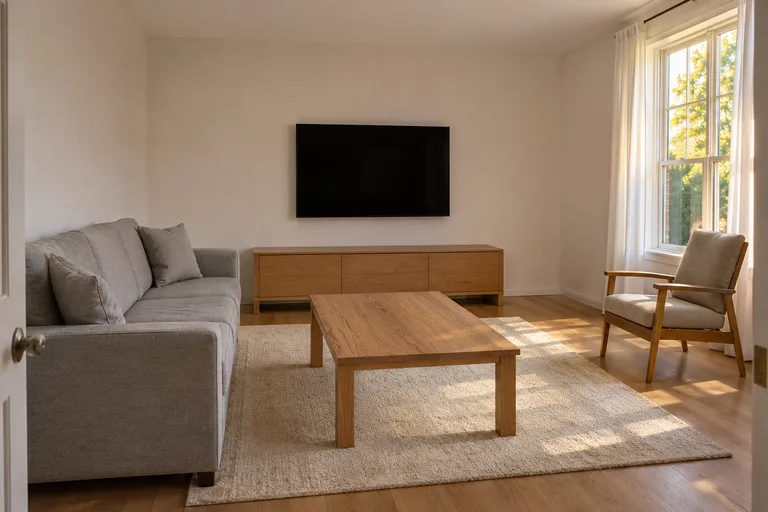 Before
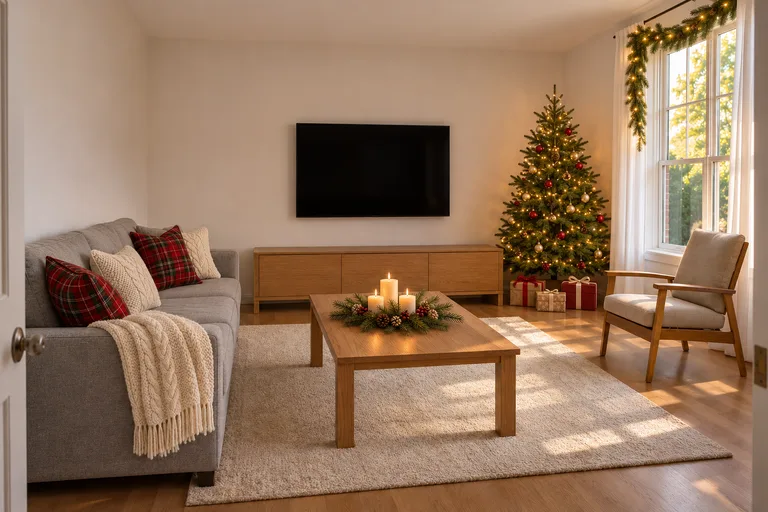 After
Start from a request and change the words
Living room with a tree
Add Christmas decorations to this room: a decorated tree in the empty corner, warm white string lights, a garland and plaid cushions. Keep the walls, windows, sofa and other furniture where they are.
Open with this request →Dinner table for guests
Set this room for a holiday dinner: a table runner, candles in holders, simple greenery, place settings and two extra chairs at the table. Keep the walls, windows and floor as they are.
Open with this request →Nothing on the walls
Add renter-friendly Christmas decor with nothing fixed to the walls: a small tabletop tree, string lights along the shelves, a wreath on the door and festive cushions. Keep the furniture where it is.
Open with this request →The request goes into the tool with your photo and is used for the first preview. To try another direction, edit the words and tick My furniture, Layout, Floor and Wall color under Keep before generating again.
Make room for the tree and the guests
If the only free corner is behind the sofa, decorating the photo will not solve it. Rearrange first: upload the same photo, choose a layout goal and describe the space you need, such as a clear corner by the window for the tree and room for two extra chairs. Then decorate the layout you like.
Rearrange the room firstWhere a holiday preview goes wrong
It restyles more than you asked
A new sofa fabric, wall color or rug can appear with the decorations. Discard that image or generate again with the keep options ticked; the picture is a visual idea, not a promise about the room.
Sizes are not measured
The tree in the picture has no real height or width. Measure the corner, the ceiling and the walking path to the door before you order a tree or a table extension.
It does not check safety
A generated tree can sit beside a radiator or under candles. NIST's holiday fire-safety guidance says to keep the tree at least three feet away from any heat source and to keep it well-watered. Read the guidance
FAQ
How much does a holiday preview cost?
New accounts get 5 free credits after signing in with Google. Each preview uses 1 credit, and every new direction is a new generation.
Will it keep my furniture?
Only as a request. Each request above already asks to keep the walls and windows; for later previews, also tick My furniture, Layout, Floor and Wall color under Keep. The generated image can still change a piece, a color or the room's proportions, so compare it with your photo.
Can I use it for Thanksgiving or another holiday?
Yes. Edit the request to describe the table, colors and decorations you want; the tool does not have a fixed holiday theme, it follows the words in the request.
RoomFlip · checked November 15, 2026